I Built a Twixt Practice and Analysis Tool: Route 5

Public forum discussion.

#1 · 56blackoak

13 Sep 2026
image

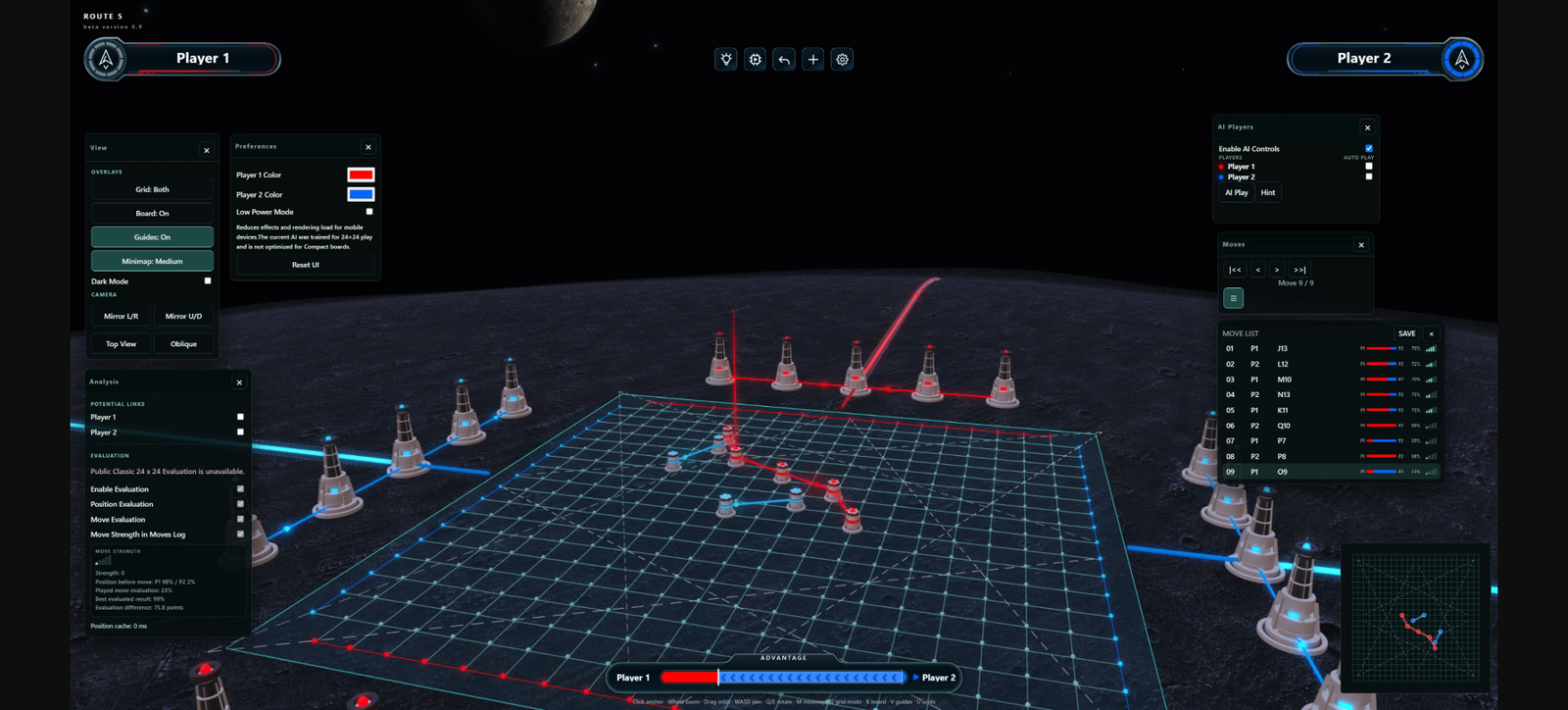
I’ve been building a Twixt practice/analysis tool in my spare time, and it’s finally getting close enough to share.

The main idea is to make it easy to play around with Twixt positions, review games, practice against a computer opponent, and hopefully make the game a little more approachable for newer players.

Route 5 has a normal Classic mode, as well as an optional 3D mode with a sci-fi theme, where the board is presented as an energy network on a planet.

With permission from the developer of TwixtBot, I have integrated its AI model into Route 5. It can be used for move evaluation, position evaluation, win-probability estimates, and hints while studying a position.

You can also play against the computer on 20×20, 18×18, and 16×16 compact boards, which makes AI games more practical in terms of thinking time.

Other features currently include:

importing game records from Little Golem and TwixTLive for replay and analysis
online two-player games through an invite link
an interactive beginner tutorial that explains the basic Twixt rules directly on the board
no installation required — it runs in a web browser

My intention is not to replace Little Golem, TwixTLive, or any existing Twixt community. I see Route 5 more as a complementary tool: somewhere to experiment with positions, review games, practice, and help new players get into Twixt.

It is still a beta, so there may be bugs or browser/device-specific issues. I’m developing it as a hobby in my spare time, so I may not be able to fix every issue or implement every suggestion immediately, but feedback, bug reports, and general impressions would be very welcome.

And finally, many thanks to everyone who has already helped me test and debug it during development.

Route 5:
https://route5.online/

I hope some of you find it useful — and I’d be very interested to hear what experienced Twixt players think of it.

Goro / 56blackoak
#2 · Carroll

13 Sep 2026

Very nice, thanks for the effort.
I tested it and for a beta it works really well, and the AI does not think for too long, the graphics are stunning !
I like also that the hint is,taking more time to give good advice. but Îd like a heat map, not just one move as I think that would give more hints at possible zones where to play for a beginner.

#3 · 56blackoak

13 Sep 2026

Hi Carroll,

Thanks for trying it out and for the great feedback! I’m glad to hear that it’s working well for you.

A heat map is a fantastic idea, especially since there are usually several strong candidate moves and the AI’s top recommendation isn't always the best fit. Currently, if you click a potential move on the grid, it displays the strength of that move before you confirm it with a second click.

I'll keep working on improvements!

#4 · Alan Hensel

14 Sep 2026

This is fantastic!

Is the AI server-side, or client-side (like lc0-js)?

One bug I noticed: the crucial diagonals are all for a 24x24 board, even on smaller boards. The diagonal lines should always lead to the corners (b2 and its reflections).

#5 · 56blackoak

14 Sep 2026

Thanks Alan! Glad you like it.

The AI is entirely client-side. The TwixtBot model runs in the browser with TensorFlow.js, and the search runs in a Web Worker, so there is no server-side inference. In that sense, yes, it is similar to lc0-js.

One caveat is that the neural network was trained for the standard 24x24 board, and I’m adapting it to the smaller compact boards rather than using a separately trained model. Because of that, its play can sometimes look a little odd near the edges on smaller boards.

And great catch on the crucial diagonals. You're absolutely right — they are currently based on the 24x24 board coordinates and aren't being recalculated correctly for the smaller boards. They should always line up with b2 and its reflections for the active board size.

I'll fix that. Thanks for spotting it!

#6 · Alan Hensel

16 Sep 2026

I just realized I can play against the AI on my phone! 16x16 is a pretty good size for that.

Is there a way to adjust the strength of the bot? I think it would be great for beginners if there was a bot that wouldn't crush them, and they could graduate to an intermediate bot when they're ready, and so on up to a master level bot.

#7 · David J Bush

16 Sep 2026

I guess if row handicaps were implemented, the bot would have to be trained for each handicap at each grid size and for both rule sets (standard and PP.) I use Firefox under Linux. Is anyone else with Linux able to use the site without crashing?

#8 · 56blackoak

16 Sep 2026

Thanks for the feedback! TwixtBot is still fairly strong even with MCTS set to 0, so I’m going to experiment with adjusting the policy sampling to let it choose slightly weaker moves from time to time. Hopefully that will make it possible to create more beginner-friendly difficulty levels without retraining the model.

David's crash seems to be caused by a specific graphic chipset with 3D rendering. I am working on a fix to automatically detect the compatibility and switch to classic mode.

#9 · 56blackoak

20 Sep 2026

enter image description here

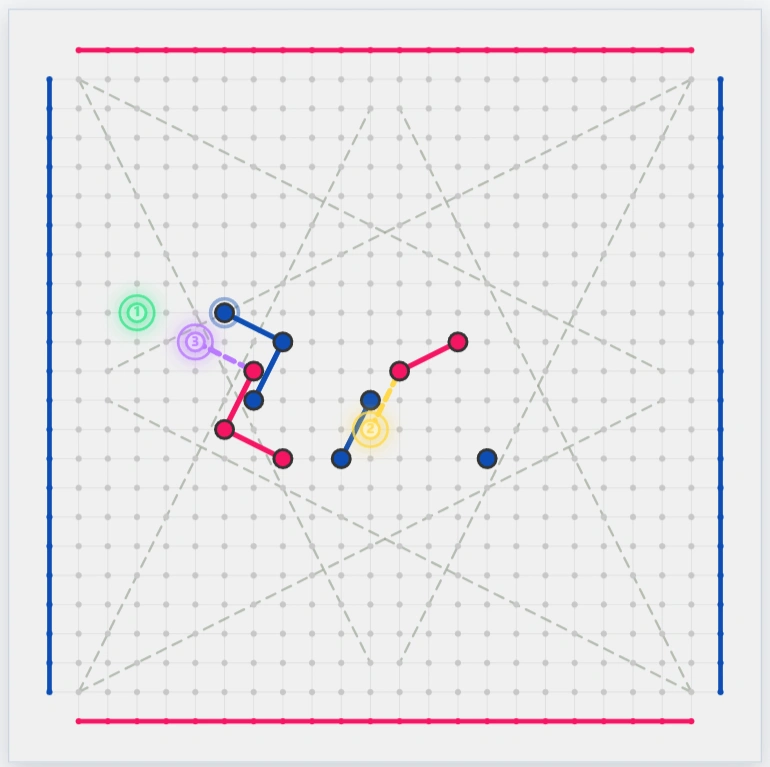
I’ve just updated Route 5 with a few new AI features.

There are now four AI difficulty levels: Beginner, Intermediate, Advanced, and Master.

I also updated Hint under Game Menu > Analysis so it can show not only the best move, but also the second- and third-best candidates.

If you have a chance to play a few games, I’d really appreciate any feedback on the difficulty levels — especially whether the gaps between them feel about right.

Thanks, and have fun!

#10 · Flemming Jensen

22 Sep 2026

Thanks a lot. Realy usefull. In play with friend mode the "match details" popup sticks for the "invited". BTW, some kind of "comment" field may come in handy when you play with a skilled friend as a teacher.

#11 · 56blackoak

22 Sep 2026

Thanks for the feedback! I’ve added a close button to the pop-up. I’ll also look into how a comment feature could be integrated into friend matches.